Tampilkan postingan dengan label 4. Tampilkan semua postingan

Launcher 8 Free v1 5 4 apk

Senin, 31 Oktober 2016

0 komentar

Description
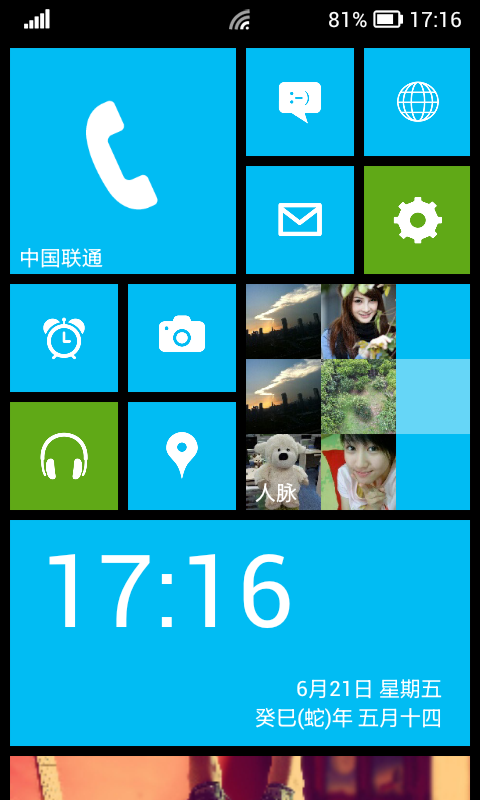
Launcher8 is a great app for you to experience the brand new style UI on your Android mobile phone.You can esay design look like Windows Phone 8 layout (fake wp8)and show off to your friends!

Features:
- You can add different size tiles;
- You can add a variety of color tile;
- You can save and restore the theme;
- You can edit the start screen layout;
- You can set the current background style;
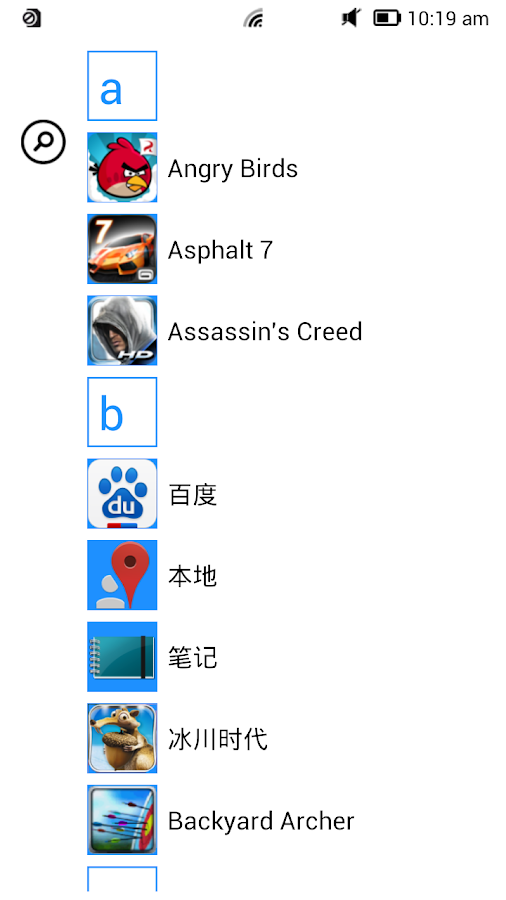
- You can switch the application list style
- You can add Android widgets in the tiles;
- You can set the wp8 style lock screen and status bar;
- You can select more than one hundred kinds of theme colors;
- You can add special features tiles,like time,flashlight,pictures and contact photo.

Change Log
- Increased support for the installation of Tablet PC
- to reduce hardware requirements for installation of equipment
- the module layout optimization time
- optimize the list of wallpapers and themes refresh function

Images


Downloads
Download

 
Read More..

Beach Buggy Blitz v1 3 4 apk

Kamis, 01 September 2016

0 komentar

Description
Drive your hot-rod beach buggy as far as you can into the uncharted depths of a mysterious tropical island!
Swerve and smash through a gorgeously detailed and completely destructible world packed with Tiki statues, grass shacks, giant crabs, lava monsters...even yetis! Explore sun-swept beaches, secret caves, fog-shrouded swamps, ruined temples and erupting volcanoes in this action-packed quest of discovery and mayhem!

Build a performance-boosting collection of upgrades and powerups! Unlock new vehicles like the Lightning muscle car and Rock Stomper monster truck. Upgrade your cars and customize their paint jobs. Collect wacky new characters. Unlock and upgrade amazing powerups like the fire-spitting Boost, the coin-tastic Coin Bubble, and a Shield that turns you into a unstoppable smash-everything force of destruction!

FEATURES:

“Infinite Drive” Environment
Drive for miles and miles in a detailed procedural world that never plays the same way twice.

Tons of Unlockable Content
Unlock new cars and characters, upgrade cars, and improve your game with performance-boosting powerups and gadgets.

Intuitive controls
Easy to pick up and play – challenging to master. Supports tilt, touch-screen, and most gamepads.

Incredible physics
Detailed off-road powersliding physics with fully modeled, animated suspensions. From monster trucks to sports cars, every vehicle feels unique.

Google Play games services
Log in with your Google account to save and sync your game to the cloud, earn Achievements and compete with your Circles for the highest scores on the Leaderboards!

Special effects for Quad Core!
Quad Core devices like Nexus 7 and Galaxy S3 get extra effects like motion blur, lens splash, dynamic headlights in caves, real-time rendered car shadows and more!

Change Log
- Minor bug fixes

Images


Downloads
Download

 
Read More..

Virtual Drumming 4 0 For Android Download Apk

Kamis, 18 Agustus 2016

0 komentar

Virtual Drumming For Android Download Apk


Software Information :

File Name:       Virtual Drumming 4.0.apk
File Size:      14.31 MB
Requires Android:      2.1 and up
Language:      English
License:      Freeware

Download Apk

 Virtual Drumming


Read More..

Handcent SMS 4 3 5 For Android Download APK

Senin, 11 Juli 2016

0 komentar

Handcent SMS 4.3.5 For Android Download Apk


Software Information :

File Name:       Handcent SMS 4.3.5.apk
File Size:      3.07 MB
Requires Android:      2.1 and up
Language:      English
License:      Freeware

Download APK

 Handcent


Read More..

Quran Android v2 4 7 apk SD Data

Rabu, 04 Mei 2016

0 komentar

Description
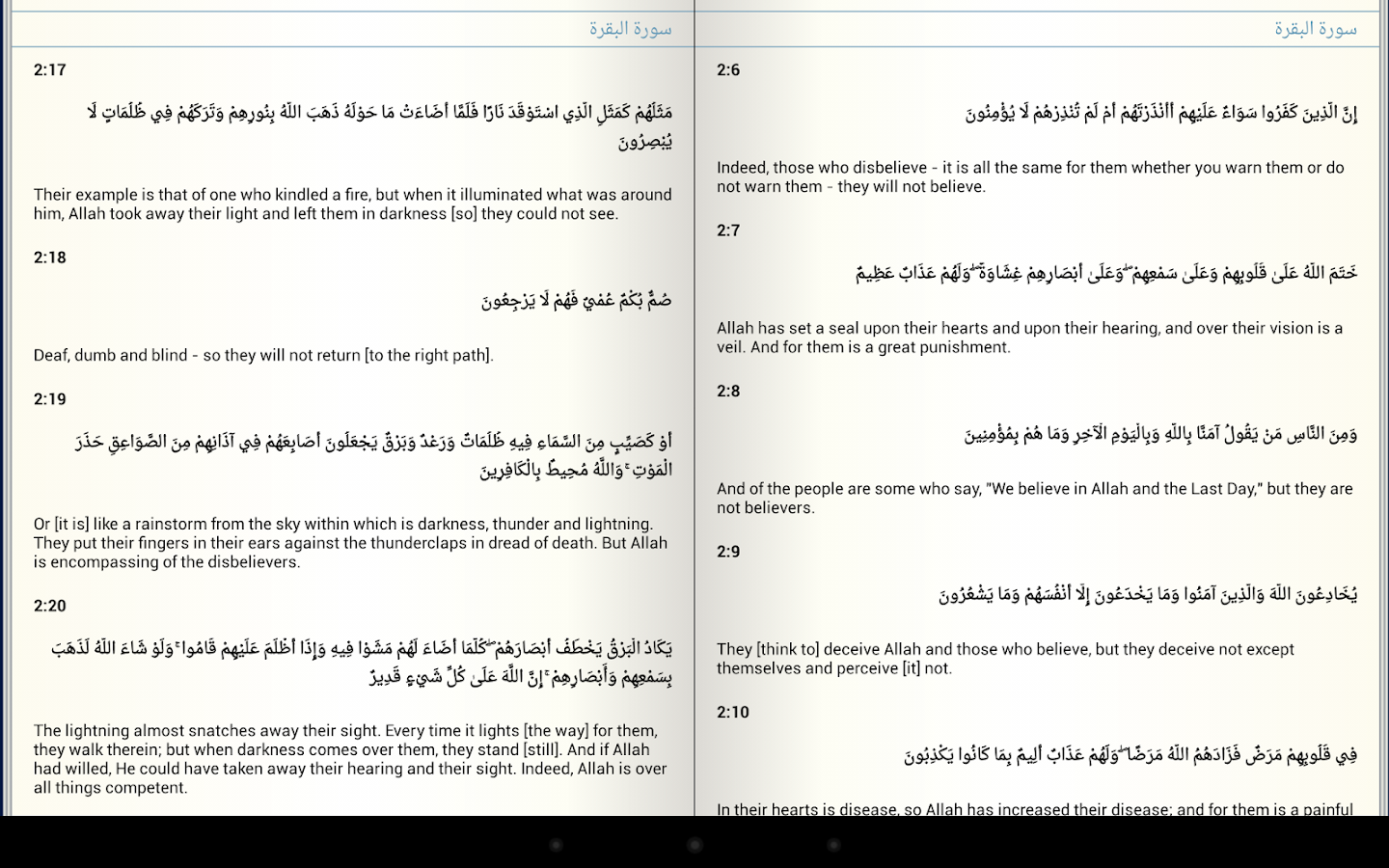
Quran Android is a free, open source Quran application for Android devices. There are many features under development.

Features:
- Updated Index
- Gapless audio playback
- Ayah bookmarking
- Ayah share
- Ibn Katheer and Saady Tafsir
- Audio recitations are available for streaming and downloading with highlighting support (tap the screen for to get the audio toolbar).
- search
- beta: night mode
- beta: audio repeat
- crystal clear Madani compliant images.
- translations in many different languages (currently, Arabic Tafseer, English Sahih International Translation, French, German, Indonesian, Malay, Spanish, Turkish, Transliteration, Bosnian, Russian, Bengali, Kurdish, Somali, Dutch, Swahili, Malayalam, Azerbaijani, Tamil, and Urdu) with more coming soon.

Change Log
- fix crash while playing audio at the end of the Quran
- other misc fixes

Images


Downloads
Download - Apk
Download - SD Data

Install Info
1. Install apk
2. Extract bestapk.blogspot.com__quran_android.zip
3. Copy quran_android folder to /sdcard/

Thats it..

 
Read More..

Asphalt 7 Heat v1 0 4 Full Version Apk Data Link Fixed

Sabtu, 15 Februari 2014

0 komentar
Asphalt 7: Heat v1.0.4 Full Version (Apk+Data) Link Fixed


Asphalt 7: Heat :

A FIRST-CLASS LINEUP
Drive 60 different cars from the world’s most prestigious manufacturers, like Ferrari, Lamborghini and Aston Martin, including the legendary DeLorean.

RACE ACROSS THE GLOBE
Gear up to race on 15 tracks set in real cities around the world, including brand new tracks in Hawaii, Paris, London, Miami and Rio.

CHALLENGE THE WORLD
The completely revamped multiplayer lets you take on up to 5 of your friends locally or online. Keep track of who’s the best with the new Asphalt Tracker that lets you compare stats, show off achievements and challenge rivals. You can also find new online opponents with the matchmaking system. Practice haHit the speed of heat in the newest, fastest, most visually stunning edition of the famed Asphalt series.

A FIRST-CLASS LINEUP
Drive 60 different cars from the world’s most prestigious manufacturers, like Ferrari, Lamborghini and Aston Martin, including the legendary DeLorean.

RACE ACROSS THE GLOBE
Gear up to race on 15 tracks set in real cities around the world, including brand new tracks in Hawaii, Paris, London, Miami and Rio.rd, because there are special events that will pit you against the best in the world!
YOUR WAY OR THE HIGHWAY
Play however you please with 6 different game modes packed with 15 leagues and 150 different races.

CUTTING EDGE GRAPHICS
Every car and track is more beautiful than ever thanks to graphics that push the limits of your device and the Retina display.

A RECORD OF SUCCESS
Acclaimed by both media and players, the Asphalt license has already attracted several million players worldwide... Come and join the ride!

Whats in this version: (Updated : Dec 7, 2012)
★Ready to hit the speed of heat once more?★
Gear up for the most exciting Asphalt update yet!
New special events with 2 wild Nissan challenges
New limited-time Nissan track through Tokyo
2 brand new Nissan cars: the Juke nismo and Juke-R
Come, join the race and challenge the world!
Required Android O/S : 2.2+


Instructions:
Install APK
Copy com.gameloft.android.ANMP.GloftA7HM folder to sdcard/Android/Obb/ (If you have installed v1.0.3 no need to download main obb)
Extract Patch.1040 OBB to sdcard/Android/Obb/com.gameloft.android.ANMP.GloftA7HM folder
Launch the game (run online@ 1st run)


Read More..

Pou 1 4 16 Download Pou 1 4 16 New Game For Free

Minggu, 19 Januari 2014

0 komentar
 Name : Pou 1.4.16 For Mobile

Image Source : www.pou.me

Format : java, jar, apk, ipa, ios, sis.

Tags :Pou 1.4.16 download, download Pou 1.4.16, Pou 1.4.16 for nokia, samsung,micromax, blackberry, sony, android, ios, ipad, iphone, java, jar, ipa,descargar.

Review Pou 1.4.16
  • Pou 1.4.16 is one of the best software and most downloaded app developed by www.waze.com.
  • Pou 1.4.16 is available on different platforms like android, windows phone, black berry, Symbian, download Pou 1.4.16 latest version.
  • Download latest version of  Pou 1.4.16 and enjoy the application.

Advertisement

    
Download
1. Download Pou 1.4.16 from Official website.
2.Vist Google Play.
Read More..

Dungeon Hunter 4 v1 1 0 1 1 0 APK DATA MOD Unlimited Golds Diamonds

Jumat, 17 Januari 2014

0 komentar


Dungeon Hunter APK+DATA MOD Unlimited Golds+Diamonds

More in new in this version, the biggest Action is now going on

  • Improved balancing and difficulty early in the game
  • 3 new levels of difficulty in all solo & Co-op arenas, with epic loot drops
  • Over 100 new missions to complete!
  • New powerful sets of weapons & armor for each class
  • New craftable items and new crafting ingredients to forge even better weapons
  • Improved PvP matchmaking
  • Major bug fixes
  • Character stats dropping in Co-op
  • Character level reset
  • Other bugs fixed


Requires Android: 2.3 and Up
Version: 1.1.0
Google Play : LINK

Instruction :

  1. Install APK,Place data folder in SDCard/Android/Obb/ and Play
  2. Purchase anything using Diamonds and your Diamonds will be increased
  3. If Mod doesnt work then reinstall the MODDED APK file over installed one and then play


Download
APK+DATA MOD Part 1
APK+DATA MOD Part 2
APK+DATA MOD Part 3
APK+DATA MOD Part 4
APK+DATA MOD Part 5
APK+DATA MOD Part 6
APK+DATA MOD Part 7
APK+DATA MOD Part 8
Read More..

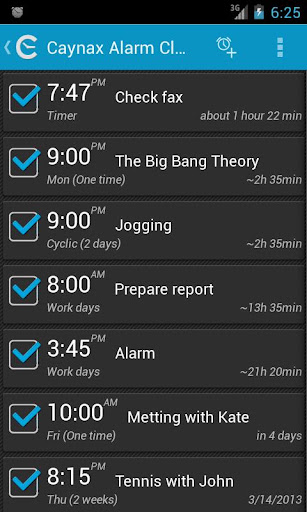
Alarm clock PRO v6 3 4

Minggu, 12 Januari 2014

0 komentar
Alarm clock PRO v6.3.4

Alarm clock PRO v6.3.4: Android v2.1+, Rooted, Google Play Store v3.10.9 Mod

Alarm clock PRO v6.3.4: So far PRO Alarm clock PRO v6.3.4 ads - added soon.

Whats PRO Alarm clock PRO v6.3.4 :

- small developer t app

- No ads (smaller app size, no app crashes, lower battery usage)

- Full alarm profiles support

- Shake

- Widgets (>= Android 3.1).

- Widgets placed (>= Android 4.2).

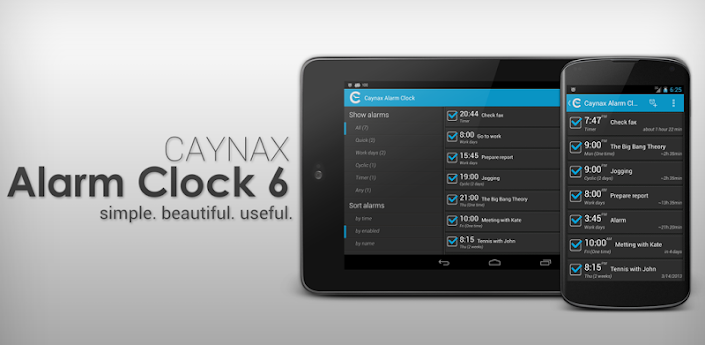
Caynax Alarm Clock

Functional alarm clock GUI (Graphical User Interface). Language packs Alarm clock PRO v6.3.4 alarm clock size.

Alarm clock be used list (tasks list) reminder.

Whats Alarm clock PRO v6.3.4 :

If t see alarm clock after update please restart .

Open alarm clock after update.

Lots - because characters lim change log .

New navigation.

Added new annual/birthday alarm.

Some phones sent wrong inner time changed broadcasts result snoozed alarms.

Alarm clock PRO v6.3.4 time picker control.

Added default profile newly create alarm.

Added option alarms list.

...

/>

https://play.google.com/store/apps/d...alarmclock.pro

Download : Alarm clock PRO v6.3.4:

1. Install Google Play Installer

2. Run "Installer cracked GooglePlay" "Install ".

3. Enable Internet.

4. Install Alarm clock PRO

5. Run

http://www.tusfiles.net/u3ehqvhxnc6x

http://hugefiles.net/eidfg7s6cxju

Google Play Installer v1.0.8

Install "Installer cracked GooglePlay", press "Install ".

http://www.tusfiles.net/xn3ax3kh0qgy

http://hugefiles.net/6z1wrv0h5v8j

Read More..

How to Root Galaxy S4 Canadian SGH I337M on Android 4 2 2 Jelly Bean Firmware

Selasa, 07 Januari 2014

0 komentar
Samsung Galaxy S4 (Canadian) SGH-I337M users who have already installed their devices with Android 4.2.2 Jelly Bean, may root their devices using the tutorial below.

This tutorial uses CF-Auto-Root file released by recognised XDA Developers, Chainfire. The CF-Auto-Root file allowing Galaxy S4 users to root their devices easily without depending on the firmware. It completely supports Android 4.2.2 Jelly Bean and future firmware as well.

Disclaimer: Rooting voids the warranty of your device. We and the developer of this rooting procedures shall not be held responsible if any undesirable outcomes may happen to your device. use of this root guide is solely at your own risk!

Pre-requisites
1) Install USB Driver for Samsung Galaxy S4 on the computer.
2) Enable USB Debugging Mode on the phone.
3) Make a backup of all your important data before following the guide.
4) Ensure the battery of the phone is charged more than 80 per cent.
5) The CF-Auto-Root file works only on Samsung Galaxy S4 (Canadian) SGH-I337M. Applying this on any incorrect variant will brick the device. Verify the model number of the Galaxy S4 by navigating to Settings >> About Phone.

File Required
1. CF-Auto-Root (Mirror Link) for Galaxy S4 (Canadian) SGH-I337M (CF-Auto-Root-jfltecan-jfltevl-sghi337m.zip)
2. Odin 3.07

Steps to Root Galaxy S4 (Canadian) SGH-I337M Running on Android 4.2.2 Jelly Bean Firmware
Step 1: Extract CF-Auto-Root and Odin 3.07 files using winrar/7zip/winzip or any other extracting tool.
Step 2: Switch off the Galaxy S4. Then boot the device into Download Mode by pressing and holding Volume Down + Home buttons together and then press the Power button until the device turns on. Now press the Volume Up button to enter Download Mode.
Step 3: Launch Odin on the computer.
Step 4: Connect the Galaxy S4 to the computer using USB cable while it is in the Download Mode. Wait until Odin detects the device. When the device is connected successfully, the ID: COM box will turn yellow with the COM port number. Additionally, the successful connected will be indicated by a message saying Added. If Odin fails to detect the device then re-install USB driver
Step 5: In Odin, click the PDA button and select the CF-Auto-Root-jfltecan-jfltevl-sghi337m.tar.md5 file.
Step 6: Verify that Auto Reboot and F.Reset Time checkboxes are selected in Odin. Also, ensure the Re-Partition option in Odin is not selected.
Step 7: Double-check and click Start in Odin. The installation process will now begin.
Step 8: Once flashing completed, your phone will restart and soon you will see a PASS message with green background in the left-most box at the very top of the Odin. You can now unplug the USB cable to disconnect your device from computer.

Samsung Galaxy S4 (Canadian) SGH-I337M running on Android 4.2.2 Jelly Bean firmware is now rooted successfully. You may now install any app that requires root permission.

Thanks to all fellas at XDA who first tried out this rooting technique. This method was originally posted via XDA-Developers original thread.
Read More..

Sparkle Free 1 2 4 Android

Minggu, 05 Januari 2014

0 komentar
Sparkle Free 1.2.4 (Android)Current Version: 1.2.4
Requires Android: 2.3 and up
Category: Arcade & Action
V1.2.4 update:
Fixed a rare problem causing crashing.

Overview:
Sparkle the Game: Break the Orbs and Save the World!

Play the award-winning game “Sparkle” on Android for FREE and experience the state of the art in Android action puzzle games. Sparkle is an addictive, beautiful, and extremely playable experience that you don’t want to miss!

No one travels without worries in Crowberry Woods anymore!
Vast blackness has blanketed the once beautiful forest. Only small sparkles of light trickle through the all consuming darkness.

Use your orb slinger to shatter the orbs of darkness before they release their destructive powers. Can you bring the light back, from a sparkle to full bloom? Discover multitude of magical amulets and powerups, and uncover the deepest secrets. Don’t leave the fair trees of Crowberry Woods unsparkled!

“An addicting, fun game. You might start playing just for a few moments, but wind spending a lot more time with it. ”
-androidrundown.com

Sparkle Free 1.2.4 (Android) Sparkle Free 1.2.4 (Android) Sparkle Free 1.2.4 (Android)

Download:

Read More..

How to Root Galaxy Win Grand Quattro I8552 on Android 4 1 2 Jelly Bean Firmware

Sabtu, 04 Januari 2014

0 komentar
Samsung has released the latest Android 4.1.2 Jelly Bean update for Galaxy Win with model number I8552 also known as Galaxy Grand Quattro. The new official firmware is now available as an Over-The-Air (OTA) update as well as through Samsung KIES.

Samsung Galaxy Win I8552 users who have already installed their devices with Android 4.1.2 Jelly Bean, may root their devices using the tutorial below.

Disclaimer: Rooting voids the warranty of your device. We and the developer of this rooting procedures shall not be held responsible if any undesirable outcomes may happen to your device. use of this root guide is solely at your own risk!

Pre-Requisites
1. Install USB Drivers for Samsung Galaxy Win on your computer.
2. Enable USB Debugging Mode on the phone by navigating to Settings >> Developer Options.
3. Make a backup of all your important data before following the guide.
4. The Galaxy Win should be factory unlocked and not locked to any particular carrier.
5. Ensure the battery of the phone is charged more than 80 percent.
6. The ClockworkMod Recovery (CWM) and SuperSU files works only on Samsung Galaxy Win (GT-I8552). Applying these on any incorrect variant might brick the device. Verify the model number of the Galaxy Win by selecting Settings >> About Phone.

Files Required
1. CWM Recovery (Mirror Link)
2. SuperSU or the latest version
3. Odin 3.07

Steps to Install CWM Recovery on Samsung Galaxy Win I8552
Step 1: Extract Odin .zip files using winrar/7zip/winzip or any other extracting tool.
Step 2: Copy SuperSU .zip file to the SD card of the phone.
Step 3: Switch off the Galaxy Win. Then boot the device into Download Mode by pressing and holding Volume Down, Home and Power buttons together until a construction Android robot icon with a warning triangle appears on screen. Now press the Volume Up button to enter Download Mode.
Step 4: Run Odin on the computer as an Administrator.
Step 5: Connect the Galaxy Win to the computer using USB cable while it is in the Download Mode. Wait until Odin detects the device. When the device is connected successfully, the ID: COM box will turn to light blue with the COM port number. Additionally, the successful connected will be indicated by a message saying Added.

Note: If the Added message does not appear, then try re-install USB drivers or changing the port on the computer.

Step 6: In Odin, click the PDA and select the CWM Recovery .tar file. Verify that Auto-Reboot and Re-Partition options is NOT selected.
Step 7: Double-check and click Start in Odin. The installation process will now begin.
Step 8: Once installation process is completed, unplug the USB cable to disconnect it from computer. Then switch off the phone manually (Take out the battery and put it back in).

Steps to Root Galaxy Win I8552 by Installing SuperSU via CWM Recovery
Step 9: Boot the device into CWM Recovery by pressing and holding Volume Up, Home and Power buttons together.
Step 10: In CWM Recovery, select install zip from sdcard and then select choose zip from sdcard. Now, navigate to the SuperSU .zip file that you copied earlier and confirm the installation by selecting Yes.
Step 11: Once installation process is completed, return to main recovery menu and select reboot system now.

The Samsung Galaxy Win I8552, running official Android 4.1.2 Jelly Bean, is now rooted successfully. You can now install any app that requires root permission. Verify the root status of the device by downloading Root Checker app from Google Play Store.

Thanks to all fellas at XDA who first tried out this rooting technique. This root method was originally posted via XDA-Developers original thread.

Click here to know How to Update Galaxy Win I8552 with Android 4.1.2 XXAMK1 Jelly Bean official firmware.
Read More..

How to Root Galaxy Note 2 AT T SGH I317 on Android 4 1 2 Jelly Bean Firmware

0 komentar
Samsung Galaxy Note 2 (AT&T) SGH-I317 users who have already updated their devices with Android 4.1.2 Jelly Bean, may root their devices using the tutorial below.

This tutorial uses CF-Auto-Root file released by recognised XDA Developers, Chainfire. The CF-Auto-Root file allowing Galaxy Note 2 users to root their devices easily without depending on the firmware. It completely supports Android 4.1.2 Jelly Bean and future firmware as well. Head over to the CF-Auto-Root main thread to learn more about the root method.

Note: Using this root increases your flash counter. The flash counter keeps track of how many custom firmwares you have flashed, as this voids warranty. Triangle Away can be used to reset the flash counter after installing CF-Auto-Root.

Disclaimer: Rooting voids the warranty of your device. We and the developer of this rooting procedures shall not be held responsible if any undesirable outcomes may happen to your device. use of this root guide is solely at your own risk!

Pre-requisites
1. Install USB Driver for Samsung Galaxy Note 2 on the computer.
2. Enable USB Debugging Mode on the phone by navigating to Settings >> Developer Options (Android 4.0 or later) or go to Settings >> Applications >> Development (Android 2.3 or earlier).
3. Make a backup of all your important data before following the guide.
4. Ensure the battery of the phone is charged more than 80 per cent.
5. The CF-Auto-Root file works only on Samsung Galaxy Note 2 (AT&T) SGH-I317. Applying this to any incorrect variant might brick the device. Verify the model number of the Galaxy Note 2 by navigating to Settings >> About Phone.

File Required
1. CF-Auto-Root (Mirror Link) for Galaxy Note 2 (AT&T) SGH-I317 (CF-Auto-Root-t0lteatt-t0lteatt-samsungsghi317.zip)
2. Odin 3.07

Steps to Root Galaxy Note 2 (AT&T) SGH-I317 Running on Android 4.1.2 Jelly Bean Firmware
Step 1: Extract CF-Auto-Root and Odin 3.07 files using winrar/7zip/winzip or any other extracting tool.
Step 2: Switch off the Galaxy Note 2. Then boot the device into Download Mode by pressing and holding Volume Down + Home buttons together and then press the Power button until the device turns on. Now press the Volume Up button to enter Download Mode.
Step 3: Launch Odin on the computer.
Step 4: Connect the Galaxy Note 2 to the computer using USB cable while it is in the Download Mode. Wait until Odin detects the device. When the device is connected successfully, the ID: COM box will turn yellow with the COM port number. Additionally, the successful connected will be indicated by a message saying Added. If Odin fails to detect the device then re-install USB driver
Step 5: In Odin, click the PDA button and select the CF-Auto-Root-t0lteatt-t0lteatt-samsungsghi317.tar.md5 file.
Step 6: Verify that Auto Reboot and F.Reset Time checkboxes are selected in Odin. Also, ensure the Re-Partition option in Odin is not selected.
Step 7: Double-check and click Start in Odin. The installation process will now begin.
Step 8: Once flashing completed, your phone will restart and soon you will see a PASS message with green background in the left-most box at the very top of the Odin. You can now unplug the USB cable to disconnect your device from computer.

Samsung Galaxy Note 2 (AT&T) SGH-I317 running on Android 4.1.2 Jelly Bean firmware is now rooted successfully. You can now install any app that requires root permission. Verify the root status of the device by downloading Root Checker app from Google Play Store.

Thanks to all fellas at XDA who first tried out this rooting technique. This method was originally posted via XDA-Developers original thread.

Click here to know How to Update Galaxy Note 2 (AT&T) SGH-I317 with Android 4.1.2 Jelly Bean official firmware.

Read More..

How to Root Galaxy Note 2 Sprint SPH L900 on Android 4 3 Jelly Bean Firmware

Jumat, 03 Januari 2014

0 komentar
Samsung has begun rolling out the Android 4.3 Jelly Bean update for the Sprint subscribers of the Galaxy Note 2 (SPH-L900). The new official firmware is now available as an Over-The-Air (OTA) update as well as through Samsung KIES.

Samsung Galaxy Note 2 (Sprint) SPH-L900 users who have already updated their devices with Android 4.3 Jelly Bean, may root their devices using the tutorial below.

This tutorial uses CF-Auto-Root file released by Elite Recognized XDA-Developers, Chainfire. The CF-Auto-Root file allowing Galaxy Note 2 users to root their devices easily without depending on the firmware. It completely supports Android 4.3 Jelly Bean and future firmware as well. Head over to the CF-Auto-Root main thread to learn more about the root method.

Disclaimer: Rooting voids the warranty of your device. We and the developer of this rooting procedures shall not be held responsible if any undesirable outcomes may happen to your device. use of this root guide is solely at your own risk!

Pre-requisites
1. Install USB Driver for Samsung Galaxy Note 2 on the computer.
2. Enable USB Debugging Mode on the phone by navigating to Settings >> Developer Options.
3. Make a backup of all your important data before following the guide.
4. Ensure the battery of the phone is charged more than 80 percent.
5. The CF-Auto-Root file works only on the Sprint version of the Samsung Galaxy Note 2 (SPH-L900). Applying this to any incorrect variant might brick the device. Verify the model number of the Galaxy Note 2 by navigating to Settings >> About Phone.

Files Required
1. CF-Auto-Root for Galaxy Note 2 (Sprint) SPH-L900 (CF-Auto-Root-t0ltespr-t0ltespr-sphl900.zip)
2. Odin 3.07

Steps to Root Galaxy Note 2 (Sprint) SPH-L900 Running on Android 4.3 Jelly Bean Firmware
Step 1: Extract CF-Auto-Root and Odin 3.07 files using winrar/7zip/winzip or any other extracting tool.
Step 2: Switch off the Galaxy Note 2. Then boot the device into Download Mode by pressing and holding Volume Down, Home and Power buttons together until a construction Android robot icon with a warning triangle appears on screen. Now press the Volume Up button to enter Download Mode.
Step 3: Launch Odin on the computer as an Administrator.
Step 4: Connect the Galaxy Note 2 to the computer using USB cable while it is in the Download Mode. Wait until Odin detects the device. When the device is connected successfully, the ID: COM box will turn to light blue with the COM port number. Additionally, the successful connected will be indicated by a message saying Added.

Note: If the Added message does not appear, then try re-install USB drivers or changing the port on the computer.

Step 5: In Odin, click the PDA button and select the CF-Auto-Root-t0ltespr-t0ltespr-sphl900.tar.md5 file.
Step 6: Verify that Auto Reboot and F. Reset Time checkboxes are selected in Odin. Also, ensure the Re-Partition option is NOT selected.
Step 7: Double-check and click Start button in Odin. The installation process will now begin.
Step 8: Once the installation process is completed, your phone will restart and soon you will see a PASS message with green background in the left-most box at the very top of the Odin. You can now unplug the USB cable to disconnect your device from the computer.

Samsung Galaxy Note 2 (Sprint) SPH-L900 running on Android 4.3 Jelly Bean firmware is now rooted successfully. You can now install any app that requires root permission. Verify the root status of the device by downloading Root Checker app from Google Play Store.
Thanks to all fellas at XDA who first tried out this rooting technique. This method was originally posted via XDA-Developers original thread.
Read More..

Shot Control v2 4 2 Apk

Jumat, 13 September 2013

0 komentar
Shot Control v2.4.2 Apk

Requirements: Android 2.1 and up
Overview: A camera app designed to help serious photographers take better photographs. Shot Control allows photographers to better control, monitor, and manage the Android photography experience.

Its so easy to use and equally functional." - Comment From Zac
"Everything you need from a camera app on screen and in easy reach. This is the best." - Comment From Jason
"The Shot Control interface is very intuitive, and having the "roll" integrated into the main screen makes things even easier." - Comment From Mitch
"I love that I dont need menus to get to the adjustments and filters. Great work!" - Comment From January
"Shutter button remapping alone is worth the purchase." - Comment from kvn
"Really complements the Galaxy Nexus camera. Giving the user more control of the camera which will result in better photos." - Comment from Stephen

Key Features:
- Multiple Touch Focus/Meter regions on ICS (on supported devices with Android 4.0)
- Direct access to exposure control and zoom
- One tap access to ISO, White Balance, Scene Modes, Focus Modes, and Flash Mode Settings (based on device abilities)
- Custom mapping for hardware buttons (like volume down for focus, volume up for shutter)
- Pre-focus function
- 35mm style film roll integrated with the viewfinder display
- Star your favorite photos, which will be added to their own "Stars - Shot Control" group in the stock gallery app on most phones.
- With "Instant Upload" enabled in Google+, photos with stars will be "instant uploaded" to G+/Picasa as if they were taken with the stock camera app.

Whats in this version:
Fix for bugs with some HTC Cameras (Desire HD, Wildfire S) - v2.4.2
Added "HTC Zoom Bug" option in settings. Try it if you need it. - v2.4.2

Read More..

Android Office APK v3 9 4 3 9 4 build 28

Selasa, 27 Agustus 2013

0 komentar


Android Office APK v3.9.4 (3.9.4) build 28

New In this version

  • includes new features for word and excel
  • Overall System improvements
  • Word: Export your word file to a PDF file
  • Printing and emailing: now you can print your documents or email them
  • Undo/Redo up to 60 last actions
  • Toolbar buttons size and two rows toolbar
  • Insert/delete rows/columns
  • Get daily Apps At : http://www.google.com/


Download
Read More..

Awesome Note HD APK v0 6 4

Jumat, 16 Agustus 2013

0 komentar

Awesome Note HD APK v0.6.4

Highlights:

  • Now developers Bird are releasing an Android version, and while this will also be sold as a paid app in the Google Play store
  • Samsung will be bundling it as a free app on the Note 8.0 “for at least a year,” according to Michael Lin, marketing manager, Samsung Electronics.


Download here
Read More..

Xparent Tapatalk SkyBlue v2 4 10

Rabu, 14 Agustus 2013

0 komentar


Xparent Tapatalk SkyBlue v2.4.10
Requirements: Android 2.0+
Overview: This version is designed to match the Blue color of Ice Cream Sandwich but we chose to name it differently.

 Presenting: Xparent Tapatalk by B-boy™ and Droid DOES!! The Xparent Series of Tapatalk are stand-alone apps. They are not just themes and you do not need the stock Tapatalk installed to run these. The option in settings to change the theme style is just a link to the market app so that you can browse and find the color you like. Once installed, you use the Xparent Tapatalk color of choice to browse your favorite forums.There is a lot of code tweaks to get these versions working the way they do and they are 100% as functional as the stock Tapatalk, just themed out to match the color you like.

 Whats new in this version:
 Version 2.4.10
 After upgrade, If the app backgrounds are gray, please clear App Cache and Data in System Settings.


Download Instructions:
http://ul.to/lwuhgmpj
http://turbobit.net/el9kwby8wbor.html
http://rapidgator.net/file/74056697/
Read More..

Copyright © 2010-2022 Android Apk | Powered By Blogger